


Rylo: Live Call Captions
4.2773.00 Reviews
App Specs
- Version
- 2.0.12
- Updated On
- License
- Free
- Downloads
- 100,000+
- Developer
- Rylo HQ
- Categories
- Communication
- Platform
- Android
Screenshots
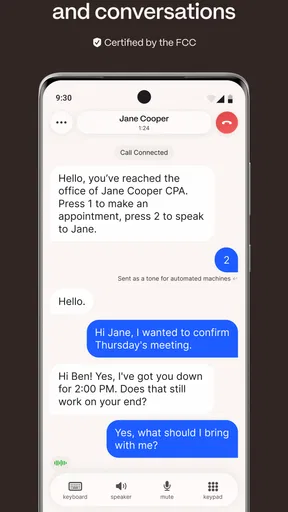
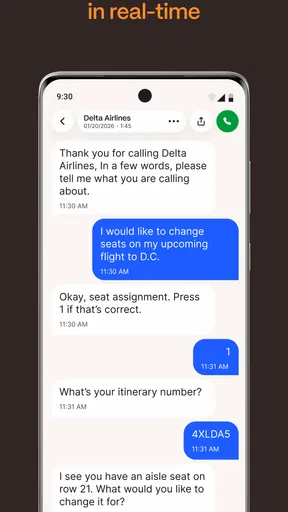
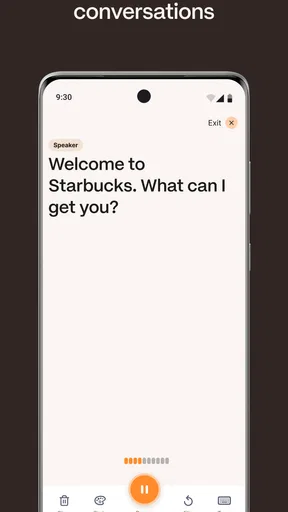
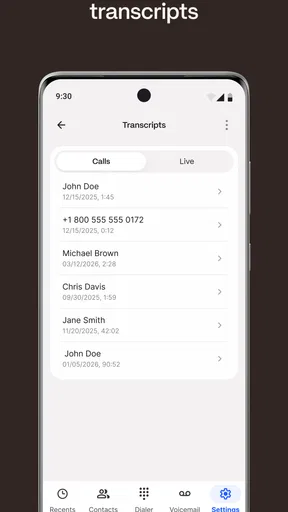
 Analysis by AppCompare
I tried Rylo: Live Call Captions with one question in mind: does it make an ordinary phone conversation easier to follow when hearing speech clearly is difficult? Its purpose is focused rather than broad. It is a communication app from Rylo HQ that places live captions around phone calls, with deaf and hard-of-hearing users at the center of its design. That narrow focus is important, because this is not a general chat service or a replacement for every accessibility tool.
My first impression was that the app makes the phone call itself the main event. Instead of asking the user to move an important conversation into a separate messaging platform, it aims to support the familiar act of calling. That can matter when a doctor’s office, delivery driver, school, workplace, or family member still expects a standard call. I found the idea especially useful for people who can speak comfortably but need visual help to follow the other person.
It is free, carries an Everyone age rating, and works on Android devices running version 7.0 or later. The current release is 2.0.12. Those details make it approachable for people using older phones, although the experience still depends on the phone, the call environment, and how clearly the other person speaks. Captions can assist communication, but they cannot remove every source of misunderstanding.
How readable and manageable the call experience feels
I find that the call experience is easiest to manage when I prepare before dialing: settle somewhere I can comfortably watch the screen, keep notes handy, and give the other person a moment to pause around important details. That makes captions feel like a useful second channel rather than another task competing for attention. It also sets up the more important question of whether that benefit stays worthwhile once the first-week novelty has passed.
Captions are most helpful when attention is already divided
Live captions are not merely a convenience for someone who missed a word. During a phone call, I often want to check a name, address, time, or number without asking the other person to repeat it several times. A visual transcript gives the conversation another path into my attention. For a user with partial hearing, that can reduce the pressure of lip-reading, which is impossible on a normal phone call anyway.
The strongest use case is a conversation with a clear purpose and a moderate pace. Imagine calling a clinic to confirm an appointment. The user can listen to whatever is audible, watch the captioned speech, and pay particular attention when the receptionist gives the date or instructions. If a detail seems wrong, it is still sensible to repeat it back and ask for confirmation. I would not treat the text as an unquestionable record, especially for names, medication instructions, or financial information.
That last point is one of the practical habits I would recommend: use the captions as support, then verify critical details aloud. Speech recognition can struggle with accents, background noise, overlapping voices, uncommon names, or a caller who speaks quickly. The app can make a call more accessible without making it error-proof. Keeping a pen, notes app, or calendar nearby is still useful when the conversation contains several details.
Worth Reading Before You Choose

EA SPORTS FC Mobile 26 Is a Bigger Football Game, but It Takes Time

Flipboard Shows What News Apps Must Do Beyond the Feed

Switching to Android Auto Means Rethinking Your Driving Routine

Google Calendar Makes a Crowded Week Easier to Manage

Ludo King Makes the Most of the Minutes Between Plans

Baby Panda World Brings Quick Play to Modern Phones, but Its Game Library Feels Busy
A focused tool is easier to understand than a crowded communication suite
Because Rylo is built around phone-call captioning, I would expect it to appeal more to someone who wants a direct solution than to someone looking for a complete communication ecosystem. There is no need to persuade family members to install the same chat service simply to have a supported conversation. That is a meaningful difference from text messaging, video calls, or relay-style services that may require both sides to change their habits.
At the same time, a focused tool can feel limited when the user’s needs go beyond captioning. Someone who wants large-scale messaging, saved conversations, video communication, or broader hearing assistance may need other tools alongside it. I see Rylo as a layer added to ordinary calling, not as the only communication app a person will ever need.
The app has an average rating of 4.1 from around 2.1 thousand ratings, with roughly 770 written reviews and more than 100 thousand installs. I read those figures as signs of a real user base rather than proof that every phone and conversation will behave identically. Caption quality is particularly sensitive to context, so one person’s excellent call may not resemble another person’s experience in a noisy home or crowded street.
Navigation matters as much as transcription
For an accessibility-focused app, I care about the path from opening it to understanding what is happening on the call. A user should not have to explore several unrelated communication features before reaching the captioning experience. In my view, the best workflow is one where the purpose is obvious: start or answer a call, keep the text easy to follow, and avoid unnecessary decisions while the conversation is underway.
There is also a cognitive benefit to reducing visual clutter. A captioning screen should not compete with the conversation by showing too many controls or decorative elements. When someone is already concentrating on speech, reading, and responding, every extra step increases fatigue. Rylo’s appeal comes from doing one central job, although the actual comfort of that job will still vary with screen size, text rendering, and the user’s preferred reading distance.
I would test it before relying on it for an important appointment. Make a short call to someone patient, check whether the text keeps up with normal speech, and see whether the layout remains comfortable after several minutes. That trial is more useful than assuming that a communication app will suit every reader simply because it provides captions.
Different abilities call for different expectations
The app is particularly relevant to deaf and hard-of-hearing people, but those groups are not identical. A person with residual hearing may use the captions to fill occasional gaps, while another user may depend on them for nearly the entire call. Someone with auditory processing difficulties may benefit from seeing speech in text, even when volume is not the main problem. A person who is deaf and communicates primarily through another method may find standard phone captioning less suitable than a service designed around their preferred communication style.
That distinction prevents me from calling Rylo a universal accessibility answer. Its value depends on whether live text during a regular phone call matches the user’s communication habits. I would recommend it as an option to test, not as a reason to abandon an established relay service, interpreter arrangement, or other assistive setup that already works well.
Motor and sensory considerations in everyday use
Captioning can reduce the need to repeatedly adjust a phone against the ear, which may be helpful for people who find long calls uncomfortable or who need to keep their eyes available for text. It may also help someone who cannot reliably distinguish speech through a small speaker. The benefit is not limited to hearing loss; it can extend to situations where listening requires too much effort.
However, visual access introduces its own demands. Reading a moving stream of text requires sustained attention and may be tiring for users with low vision, dyslexia, migraines, or certain cognitive conditions. A person who cannot comfortably read scrolling captions may need a different communication method. I would also avoid assuming that captions automatically solve problems caused by screen glare, small displays, or poor contrast. The phone’s own display settings and the user’s comfort remain part of the experience.
Motor needs can matter during a call as well. If the user has limited dexterity, a workflow requiring precise taps or quick responses may be frustrating. A useful preparation trick is to set up the phone before making a time-sensitive call: charge it, place it where the screen is easy to see, and avoid beginning the conversation while walking or carrying objects. That is simple advice, but it prevents the captioning tool from becoming one more thing to manage.
Situational access is where the app earns its place
Some people need caption support only in particular settings. A quiet call at home may be manageable without assistance, while a call from a noisy station, a busy office, or a room with several people speaking can be much harder. In those moments, live text can provide a second channel when the audio signal is inconsistent.
Consider a delivery problem. The driver calls from outside, traffic is moving, and the conversation includes a building number and a short time window. A user who cannot reliably hear every word may be able to read the key information, repeat it back, and complete the exchange without asking a neighbor or family member to intervene. That independence is one of the clearest reasons to try this app.
Another scenario is a workplace call from someone who does not know the user’s hearing preferences. Explaining the need for captions can feel awkward, especially when the call is unexpected. A tool that works with the familiar phone-call routine may make the interaction less dependent on the other person’s preparation. Still, I would tell the caller to speak one at a time and pause around important information. Captioning performs better when the conversation itself is orderly.
Travel is another possible setting, but I would be cautious. A captioning app may help with a hotel or transport call, yet a weak connection, unfamiliar pronunciation, or loud surroundings can reduce accuracy. For essential arrangements, written confirmation is safer. I would use the captions to support the call, then ask for a text message or email when the information affects a reservation, payment, or schedule.
How it compares with familiar alternatives
Compared with ordinary phone calls, Rylo offers an obvious advantage: it adds a visual route to spoken conversation. Compared with texting, it preserves the speed and immediacy of a call, which can be valuable when the other person cannot type or when the issue is easier to resolve by speaking. Compared with video calling, it does not require the user to be on camera or depend on lip-reading, both of which may be uncomfortable or impractical.
Texting remains better when precision and permanence matter. If I need a written address, a list of instructions, or a record I can review later, I would prefer a message. Video calling may be better when facial expressions, signing, or visual context are central to communication. A relay service may be more appropriate for users who need structured assistance rather than captions layered onto a direct call.
Rylo’s trade-off is therefore clear. It can make standard calls more accessible without asking the other person to learn a new platform, but it still depends on speech recognition and the conditions of the call. That makes it a strong supplement for some users, not a substitute for every alternative.
Remaining barriers I would consider before depending on it
The biggest barrier is trust. When a conversation involves health, money, legal matters, or safety, even a small captioning error can have consequences. I would repeat important facts, spell unfamiliar names, and request written follow-up whenever possible. The app should reduce communication friction, not encourage users to stop checking what they heard or read.
Another barrier is fatigue. Following audio and captions at the same time can be more demanding than using either channel alone. A long call may require breaks, a larger viewing distance, or a quieter room. Users who experience listening fatigue should plan for that rather than treating live text as an unlimited source of concentration.
There is also the question of fit. People who mostly communicate through text may gain little from a phone-call captioning tool. Users who need sign-language interpretation, highly specialized relay support, or extensive visual controls should compare it with services designed around those needs. Likewise, someone who rarely makes phone calls may find that the app solves a problem they almost never encounter.
I would also avoid testing it for the first time during an emergency. Accessibility tools deserve the same preparation as any other critical technology. Make a practice call, learn where the captions appear, and decide what backup method you would use if the conversation became unclear. That approach is not a criticism of Rylo; it is sensible planning for any tool that sits between spoken words and important decisions.
Who should try it, and who should look elsewhere
I think Rylo is worth trying for a deaf or hard-of-hearing person who still needs to handle conventional phone calls. It is especially appealing to someone who wants more independence when contacting businesses, services, relatives, or colleagues and who does not want every caller to install another app. The free price removes an obvious entry barrier, and the Everyone rating makes it suitable for a broad household audience.
I would be more cautious recommending it as the sole solution for someone who cannot use spoken phone conversations at all, who needs an interpreter, or who finds rapidly changing text difficult to read. In those cases, a relay service, text-first workflow, or communication method built around signing may be a better primary choice. The right decision depends on how the person communicates, not simply on whether captions sound useful in theory.
It may also be a poor match for people who want a full messaging platform. Rylo is not compelling because it replaces every communication habit; it is compelling because it addresses one specific gap in ordinary calls. If that gap is not part of your daily life, the app may feel unnecessary.
My inclusive verdict after using it
Rylo: Live Call Captions has a clear and worthwhile purpose. I like that it focuses on making a familiar phone call more visually accessible instead of requiring users to rebuild their communication around a separate service. For the right person, that can mean handling a practical call independently, catching a missed detail, or feeling less anxious before answering an unknown number.
My recommendation comes with a realistic condition: treat the captions as assistance, not authority. Test the app in the places where you actually make calls, learn how well it handles your voice and the voices of people around you, and keep another way to confirm important information. That is especially important for appointments, payments, directions, and anything involving safety.
With an average of 4.1 and a community of over 100 thousand installs, it has clearly attracted meaningful interest, but those figures cannot decide whether it fits your hearing, vision, reading, or motor needs. My own conclusion is more practical: Rylo is a useful bridge between spoken phone calls and text-based communication. It is a good first experiment for people who need visual support during calls, while users with more specialized communication requirements should keep their existing alternatives in the picture.
Pros
- Captions appear in real time during phone conversations.
- Can improve accessibility for users with hearing difficulties.
- Useful in noisy environments where speech is hard to follow.
- Simple call-focused design keeps the experience easy to understand.
- May help users review important details while still on the call.
Cons
- Accuracy can drop with accents
- background noise
- or overlapping speech.
- Live transcription may introduce a noticeable delay during conversations.
- Call captions may raise privacy concerns for sensitive discussions.
- Availability and features can vary by device
- region
- or carrier.
- Extended use may consume extra battery and mobile data.
FAQs for Rylo: Live Call Captions
What is Rylo: Live Call Captions and how does it work?
Rylo: Live Call Captions is designed to display spoken conversations as text while a call is taking place. It can be useful for people who are deaf or hard of hearing, callers in noisy environments, or anyone who prefers reading along. After granting the required permissions, the app processes the conversation and presents captions on screen, although accuracy can vary depending on speech clarity, accents, background noise, and connection quality.
Does Rylo: Live Call Captions work with regular phone calls and other calling apps?
Compatibility may depend on the device, operating system, call type, and the way audio is routed. Before downloading, users should check the app’s current compatibility information for their Android or iPhone model. Some captioning services work best with supported phone calls, while captions for third-party apps such as video or messaging platforms may require additional settings, speaker mode, or may not be available at all.
Is Rylo: Live Call Captions free to use?
Rylo may offer a free download while placing certain features, usage limits, or extended captioning time behind a subscription or in-app purchase. Pricing and trial conditions can change, so users should review the App Store or Google Play listing before starting a plan. Pay particular attention to renewal terms, billing frequency, cancellation instructions, and whether a free trial automatically converts into a paid subscription.
Does Rylo record calls or store the captions?
Users should carefully review Rylo’s privacy policy and the permissions requested during setup before using it for sensitive conversations. Live captioning may involve processing audio on the device or sending data to a service, depending on the app’s technology and configuration. The app’s privacy disclosures should explain whether audio, transcripts, or diagnostic information are retained, shared, or used to improve the service.
How accurate are Rylo’s live captions, and can they replace professional interpreting?
Live automatic captions can be helpful, but they are not perfect and should not be treated as a guaranteed word-for-word transcript. Accuracy may decrease with strong accents, multiple people speaking, technical terms, poor microphone quality, interruptions, or background noise. Rylo can support everyday communication, but important medical, legal, emergency, or professional conversations may require a qualified interpreter or another reliable communication method.


